Case study · August 2026
AeroOpt-X

AeroOpt-X is an aerospace-focused optimization project exploring how computational methods and engineering workflows can help analyze design choices, compare alternatives, and support more informed technical decisions.
Overview
AeroOpt-X is a project focused on the intersection of aerospace engineering, computational thinking, and optimization. The goal is to explore how engineering problems can be translated into structured workflows where design variables, constraints, and objectives can be evaluated systematically.
This case study documents the project's purpose, development approach, technical structure, challenges, and future direction.
The problem
Aerospace design involves multiple variables, competing objectives, and technical constraints. Comparing possible solutions can become difficult when assumptions, inputs, and evaluation criteria are not organized consistently.
AeroOpt-X explores how a more structured computational workflow could make the process easier to understand, evaluate, and improve.
Goals
- Define a clear aerospace optimization problem.
- Identify the relevant design variables, objectives, and constraints.
- Explore a systematic approach to comparing candidate solutions.
- Organize the project into maintainable, well-documented components.
- Establish a foundation for future simulations, testing, and validation.
Approach
- Define the engineering problem and its intended outcome.
- Identify input parameters, constraints, and evaluation criteria.
- Break the workflow into manageable computational steps.
- Compare candidate approaches using consistent assumptions.
- Document limitations and identify areas requiring further validation.
Code Architecture & Structure
AeroOpt-X is organized into distinct application, frontend, and engineering modules. Each module has a defined responsibility, creating a clear separation between the web interface, engineering calculations, optimization logic, and deployment configuration.
The architecture is designed to make the project easier to navigate, maintain, test, and extend as new engineering capabilities are introduced.
1. Application Entry Point — app/main.py
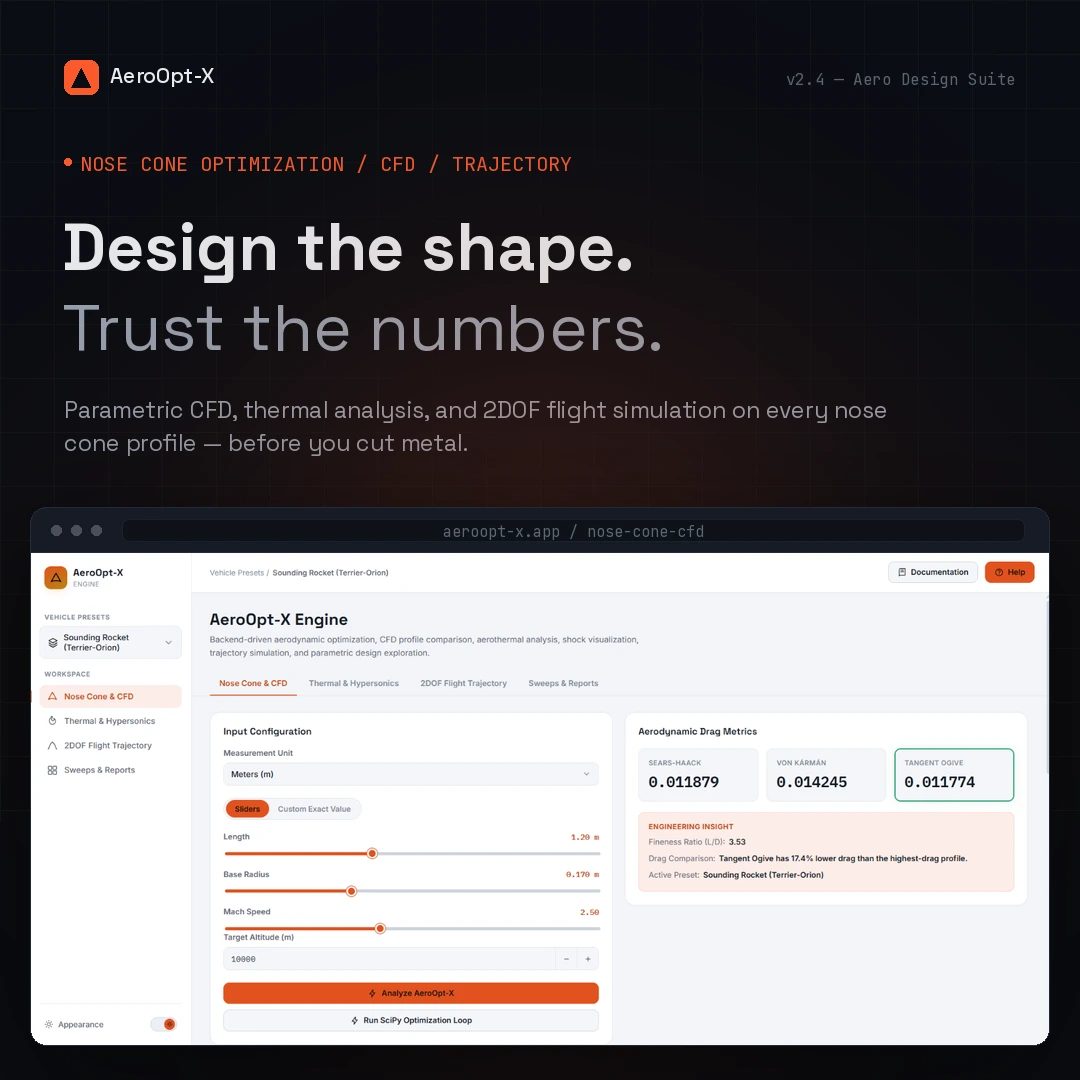
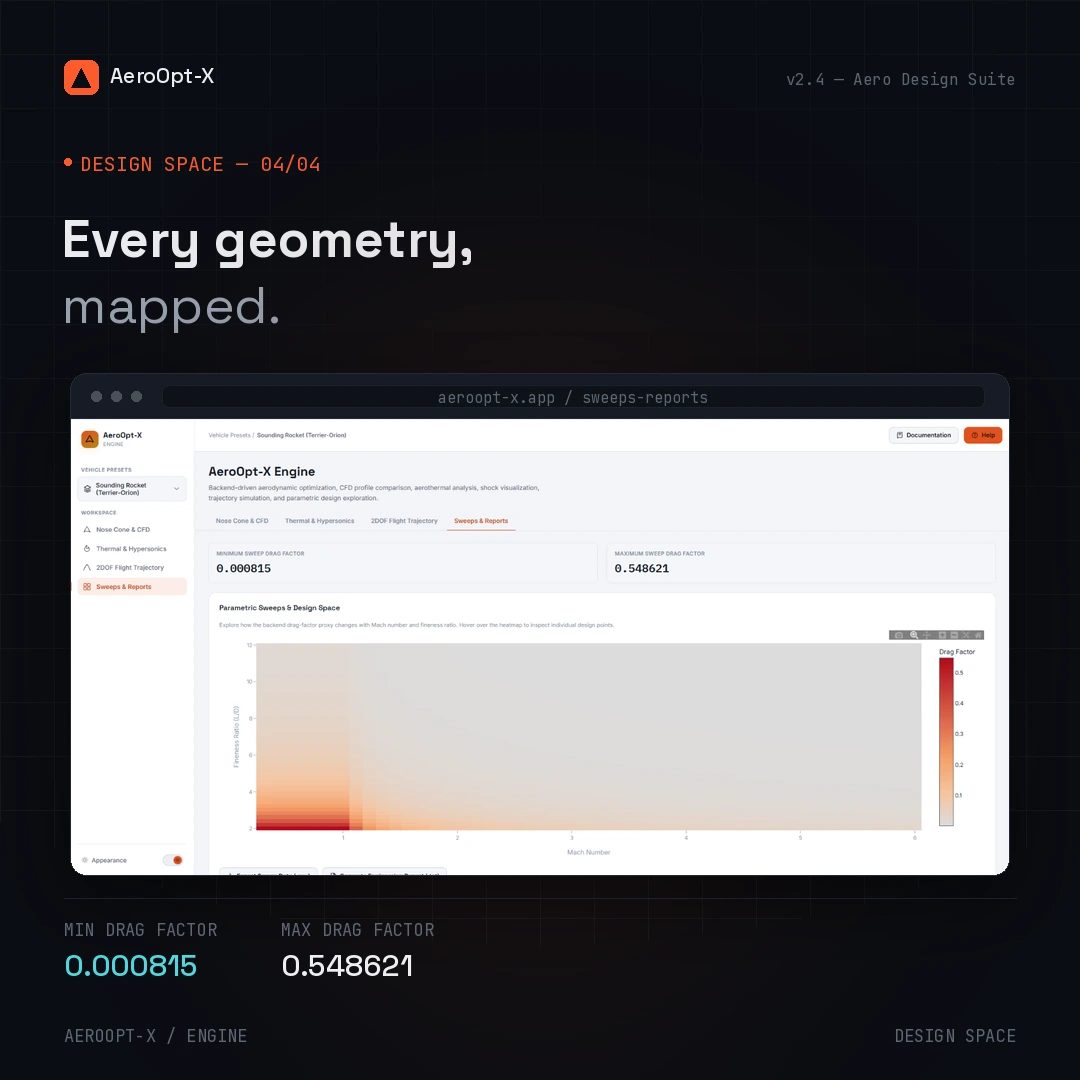
The Flask application connects the browser interface to the engineering backend. It serves the dashboard, documentation, and help pages, and exposes API endpoints for aerodynamic analysis, optimization, trajectory simulation, and parametric sweeps.
Key responsibilities:
- Serving the application pages.
- Receiving engineering inputs through API requests.
- Coordinating backend calculations.
- Returning analysis results to the frontend.
2. Frontend Layer — app/templates/ and app/static/
The frontend separates page structure, visual styling, and browser-side behavior.
Templates — app/templates/
index.html— Main engineering dashboard.documentation/documentation.html— Technical documentation page.help/help.html— User help and guidance page.
Stylesheets — app/static/css/
style.css— Main interface styling.documentation.css— Documentation page styling.help.css— Help page styling.
JavaScript — app/static/js/
api.js— Communication with Flask API endpoints.app.js— Dashboard interactions and application behavior.charts.js— Plotly-based engineering visualizations.documentation.js— Documentation page interactions.help.js— Help page interactions.
This separation keeps presentation and interaction logic distinct from the Python engineering calculations.
3. Geometry Engine — src/aeroopt/geometry/
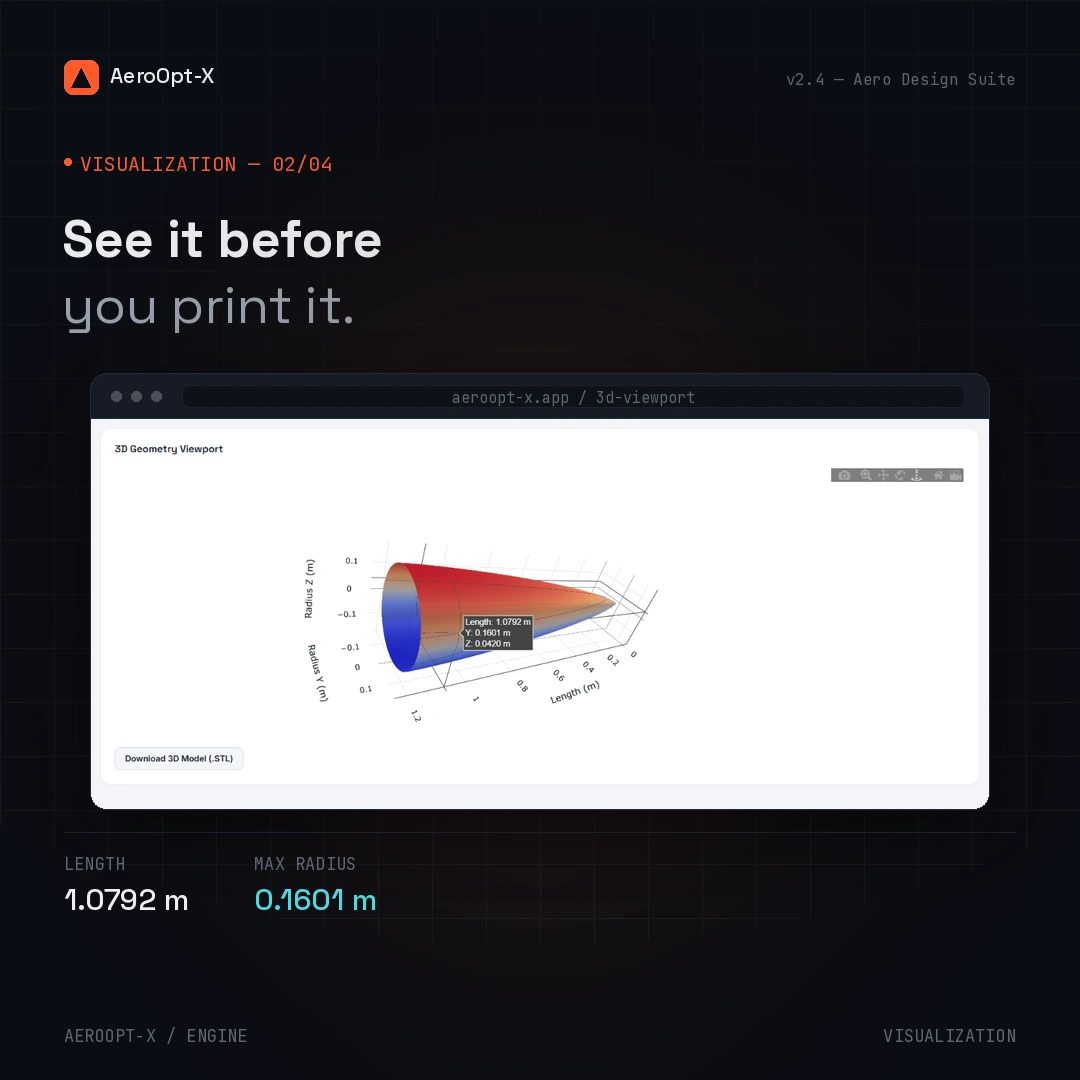
The nose_cone.py module handles parametric nose-cone geometry generation. It provides geometry profiles for comparison, visualization, and use in the aerodynamic analysis workflow.
The project includes multiple nose-cone profile approaches, allowing their geometric characteristics and estimated aerodynamic performance to be explored within a common interface.
4. Physics Engine — src/aeroopt/physics/
The physics layer groups engineering calculations into focused modules.
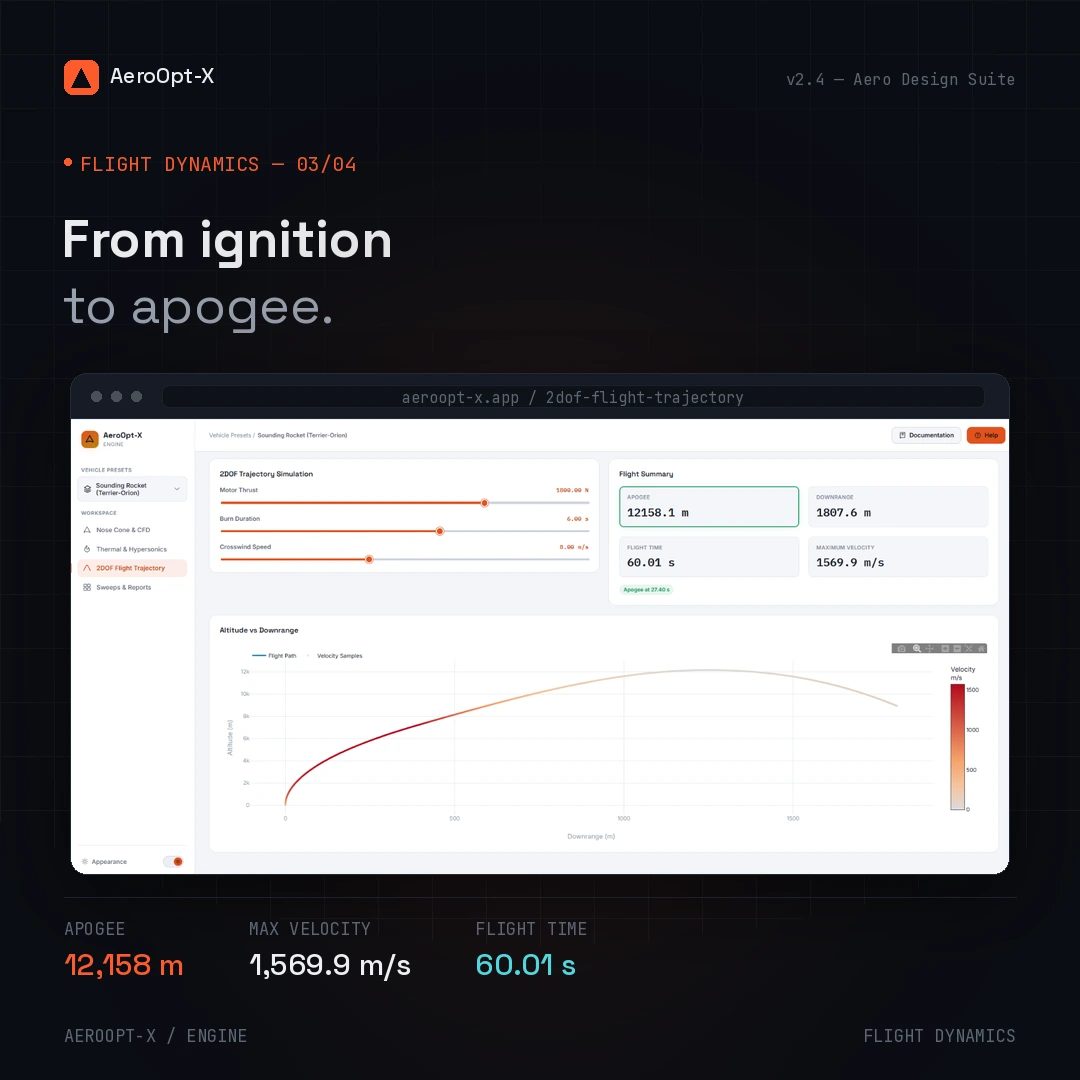
drag_solver.py— Estimates and compares aerodynamic drag.aerothermal.py— Handles aerothermal estimates, including stagnation temperature and shockwave-related calculations.trajectory.py— Implements two-degree-of-freedom flight trajectory simulation.
Separating these responsibilities keeps the engineering logic organized and makes individual calculation modules easier to inspect and maintain.
5. Optimization Engine — src/aeroopt/optimizer/
The objective.py module contains the optimization objective logic. AeroOpt-X uses SciPy's Sequential Least Squares Programming (SLSQP) method to search for an improved nose-cone design against a drag-related objective.
The optimization workflow connects design parameters with aerodynamic evaluation, enabling candidate geometries to be compared against the selected objective.
Optimization provides a structured way to explore design alternatives rather than relying solely on manual parameter adjustments.
6. API, Data Flow & Visualization
AeroOpt-X connects the browser interface to its engineering modules through a Flask API.
- Input: The user configures engineering parameters in the dashboard.
- Request: The frontend sends the inputs to the relevant API endpoint.
- Computation: The backend coordinates the applicable geometry, physics, or optimization calculations.
- Response: The API returns results to the frontend.
- Visualization: Plotly.js presents engineering data through interactive charts and comparisons.
The API provides distinct entry points for health checks, analysis, optimization, trajectory simulation, and parametric sweeps.
7. Deployment & Project Configuration
The root directory contains the files required to manage dependencies, containerization, and project documentation.
requirements.txt— Python dependency declarations.Dockerfile— Instructions for building the application container.docker-compose.yml— Configuration for running the application with Docker Compose.README.md— Project overview, setup instructions, API documentation, engineering assumptions, limitations, and roadmap.
These files support a consistent setup and provide the information needed to understand and run the project.
Architecture Rationale
AeroOpt-X separates the web application from the engineering computation layer and organizes its core calculations by domain responsibility. The frontend manages user interaction and visualization, while Python modules handle geometry, physics, and optimization.
This modular organization provides clearer development and testing boundaries and creates a foundation for extending the platform with additional geometry profiles, engineering calculations, optimization approaches, and visualizations.
Engineering scope and limitations: AeroOpt-X is intended for educational and conceptual engineering exploration. Its simplified analytical models are not substitutes for validated computational fluid dynamics (CFD), experimental testing, or professional flight-safety analysis.
aeroopt-x/
│
├── app/
│   ├── main.py
│   │
│   ├── static/
│   │   ├── css/
│   │   │   ├── style.css
│   │   │   ├── documentation.css
│   │   │   └── help.css
│   │   │
│   │   └── js/
│   │       ├── api.js
│   │       ├── app.js
│   │       ├── charts.js
│   │       ├── documentation.js
│   │       └── help.js
│   │
│   └── templates/
│       ├── index.html
│       │
│       ├── documentation/
│       │   └── documentation.html
│       │
│       └── help/
│           └── help.html
│
├── src/
│   └── aeroopt/
│       ├── geometry/
│       │   └── nose_cone.py
│       │
│       ├── physics/
│       │   ├── drag_solver.py
│       │   ├── aerothermal.py
│       │   └── trajectory.py
│       │
│       └── optimizer/
│           └── objective.py
│
├── Dockerfile
├── docker-compose.yml
├── requirements.txt
└── README.md
Challenges
Defining the optimization problem
ProblemEngineering optimization requires clear objectives, meaningful design variables, and realistic constraints. An unclear problem definition can make comparisons unreliable.
Solution:Structure the problem around explicit inputs, evaluation criteria, and constraints. Document assumptions and verify that the chosen approach matches the intended engineering task.
Building a maintainable workflow
Problem:As an engineering project grows, tightly coupled components and unclear responsibilities can make testing and future improvements difficult.
Solution:Separate the workflow into logical components, document their responsibilities, and plan for repeatable tests and validation as the implementation develops.
Outcome
AeroOpt-X establishes a project framework for exploring aerospace optimization through structured problem definition, computational workflows, and engineering-focused reasoning. The project also identifies the areas that need further implementation, testing, and validation before its capabilities can be evaluated quantitatively.
Next steps
- Complete and refine the core optimization workflow.
- Add tests for important calculations and input validation.
- Compare results against suitable reference cases.
- Document assumptions, limitations, and reproducibility.
- Publish a live demonstration if the application supports it.
- Expand the project with validated results and future improvements.
Gallery